Team Collaboration
🤝 At A1 Infinity Nexus, team collaboration support helps businesses coordinate people, tasks, information, files, communication, and shared responsibilities more effectively. We help create a clearer working environment where team members understand what needs to happen, who is responsible, and where important information belongs.
🤝 What Professional Team Collaboration Involves
Effective collaboration requires more than putting everyone into the same chat or project-management tool. Teams need clear responsibilities, shared objectives, accessible information, appropriate communication channels, and a practical way to coordinate work. Clear roles and task ownership can reduce confusion, duplicated effort, and gaps between team members.
⚠️ Where Poor Collaboration Creates Problems
When teams work in separate systems or rely on unclear communication, information can become fragmented and responsibilities can overlap. Team members may duplicate work, wait for information, miss handoffs, lose track of decisions, or remain unsure about who owns the next step.
| Team Collaboration Challenge | How We Can Help |
|---|---|
| Unclear responsibilities | Organize tasks, ownership, deadlines, and expectations so responsibilities are easier to understand. |
| Information is scattered | Structure shared documents, files, updates, and working information in accessible locations. |
| Too many communication channels | Help establish clearer communication practices around the tools your team already uses. |
| Tasks are duplicated | Improve task visibility and ownership so multiple people do not unknowingly perform the same work. |
| Handoffs are missed | Track dependencies, pending actions, and information required between team members. |
| Team members lack visibility | Maintain shared task, project, and status information so relevant people can see progress. |
| Decisions are difficult to find | Organize meeting notes, decisions, documentation, and related project information. |
| Remote teams feel disconnected | Support structured digital communication, shared workspaces, meetings, and collaborative workflows. |
🛠️ What We Can Handle Across Team Collaboration
Team Task Coordination
Organize shared tasks, responsibilities, deadlines, priorities, and follow-ups so each team member can understand what needs to be completed and how their work connects with the broader business objective.Roles & Responsibility Support
Help structure responsibilities around projects and recurring workflows so ownership is clearer and overlapping or missing responsibilities can be identified before they create operational problems.Shared Workspace Organization
Organize collaborative documents, folders, project spaces, files, and shared resources so team members can find the information they need without repeatedly asking others for access or current versions.Team Communication Coordination
Support structured communication through email, chat, meetings, project channels, and other business communication tools while keeping important updates connected to the work they relate to.Project Collaboration Support
Help coordinate project activities, task dependencies, progress updates, shared documentation, and team communication so different contributors can work toward the same project objectives.Meeting & Action-Item Coordination
Support meeting preparation, notes, action items, responsibilities, deadlines, and follow-ups so important decisions and commitments do not disappear after the meeting ends.Cross-Team Coordination
Help connect information and responsibilities between departments, workstreams, or external contributors when work depends on multiple people completing related tasks.Collaborative Documentation
Maintain shared procedures, project documents, reference materials, meeting records, and other information that teams need to access and update collectively.Progress & Status Tracking
Maintain visibility over task progress, pending work, blockers, deadlines, and completed activities so managers and team members have a clearer picture of ongoing work.
🔄 How We Strengthen Team Collaboration
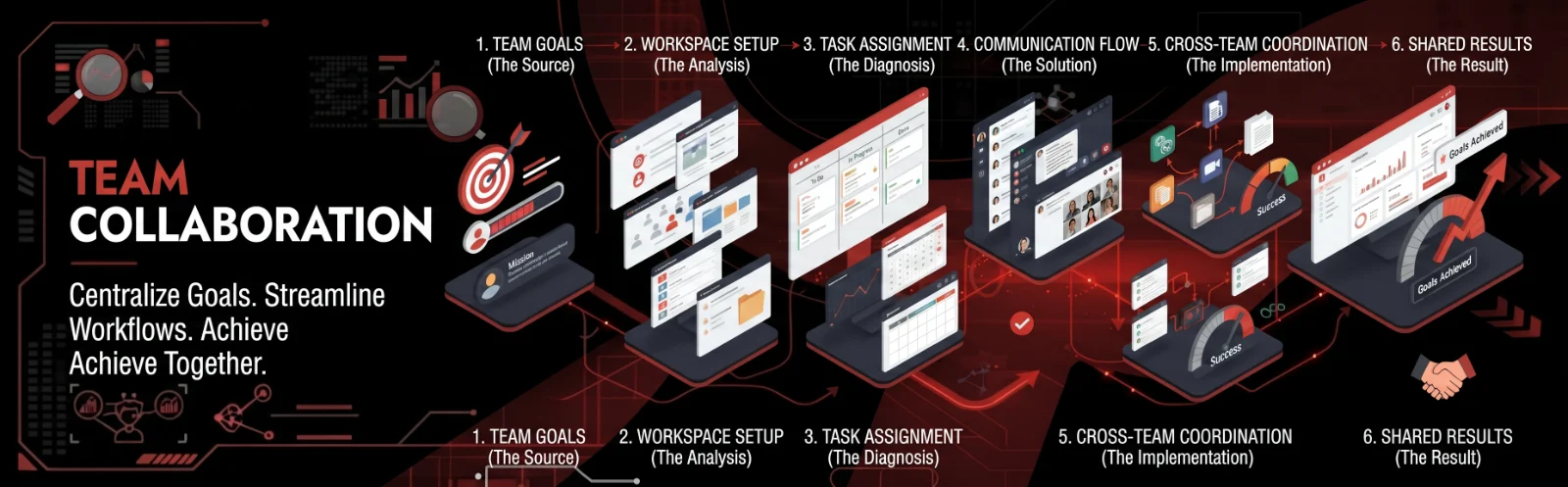
1. Understand How the Team Works
We first identify the people involved, recurring workflows, projects, communication channels, shared resources, and points where team members depend on one another.
2. Clarify Goals & Responsibilities
We help organize the objectives, tasks, responsibilities, deadlines, and expected outputs associated with the work. Clear goals and task ownership help teams understand both the desired outcome and their individual contribution.
3. Organize the Shared Information
Documents, files, task information, meeting records, and other collaborative resources can be placed into a clearer structure so team members know where to find and maintain important information.
4. Establish the Communication Flow
We help define which types of information should be communicated through email, chat, meetings, project channels, documentation, or other appropriate methods. Different stakeholders may require different levels and frequencies of information.
5. Coordinate the Moving Parts
We track dependencies, handoffs, pending actions, approvals, and other activities that require multiple people to contribute before the work can move forward.
6. Review & Improve Collaboration
As the team works, recurring communication gaps, unclear responsibilities, duplicated work, or workflow bottlenecks can be identified and used to improve the collaboration structure over time.
💎 What Better Team Collaboration Can Give Your Business
Clearer ownership by making responsibilities and task expectations easier for team members to understand.
Less duplicated work by improving visibility into who is working on what and where information is already available.
Better information flow through organized communication channels, shared files, documentation, and updates.
Smoother handoffs by making dependencies, pending actions, and responsibilities more visible between team members.
Stronger team coordination by connecting individual tasks with shared business and project objectives.
🏢 Team Collaboration Across Different Business Functions
Team collaboration support can be applied across operations, administration, sales, customer support, business development, e-commerce, real estate, property management, research, project coordination, and executive support. It can support both small teams and growing organizations where multiple people need to coordinate work, information, and responsibilities.
🌍 Collaboration for Remote & Distributed Teams
Remote and distributed teams depend heavily on digital workspaces for communication, file sharing, meetings, project coordination, and documentation. Structured collaboration can help reduce the isolation of separate workstreams by giving team members shared places to communicate, access information, and coordinate their responsibilities. Microsoft Teams, for example, supports conversations, file sharing, meetings, and project collaboration within shared team spaces.
📋 Shared Documentation & Knowledge
Collaboration becomes easier when important information is documented instead of remaining inside individual conversations. We can help maintain shared procedures, meeting records, project information, reference documents, checklists, and other resources that allow team members to access consistent information when they need it.
🎯 Built Around Your Existing Team Structure
Every organization has its own hierarchy, responsibilities, communication preferences, tools, and working culture. We can work around your existing structure and improve the areas creating friction instead of forcing your team to completely change how it operates.
🔐 Organized Collaboration With Clear Access
Collaborative work often involves internal documents, customer information, project details, and business decisions. We support organized information handling and can work within the access, sharing, and permission standards established by your organization.
💻 Team Collaboration Tools & Platforms
| Collaboration Area | Tools & Platforms |
|---|---|
| Team Communication | Slack, Microsoft Teams, Google Chat |
| Video Meetings | Zoom, Google Meet, Microsoft Teams |
| Project Management | Asana, Trello, ClickUp, Monday.com |
| Documents | Google Docs, Microsoft Word |
| Spreadsheets | Google Sheets, Microsoft Excel |
| File Sharing | Google Drive, OneDrive, SharePoint, Dropbox |
| Knowledge Management | Notion, Confluence |
| Scheduling | Google Calendar, Outlook Calendar |
| CRM Collaboration | HubSpot, Salesforce, Zoho CRM |
| Task Tracking | Asana, Trello, ClickUp, Microsoft Planner |
📊 Collaboration With Better Visibility
A collaborative team needs more than communication-it needs visibility into work. Shared task boards, project schedules, status updates, documentation, and reporting can help team members understand what has been completed, what is currently active, what is blocked, and where another person's contribution is required.
🔗 Strengthen Your Team's Working Environment
Project Coordination - Coordinate project tasks, deadlines, dependencies, stakeholders, and progress across your team.
Communication - Improve the flow of internal and external business communication so important information reaches the right people.
About Us - Learn more about A1 Infinity Nexus and our approach to structured business support.
🚀 Help Your Team Work Together More Clearly
Strong collaboration gives people clearer responsibilities, better access to information, and a more organized way to work toward shared objectives. A1 Infinity Nexus provides structured team collaboration support around your existing people, processes, communication channels, and business tools.
📩 Start Your Team Collaboration Support
Tell us where your team is experiencing communication gaps, unclear responsibilities, duplicated work, or coordination problems, and we can structure the support around your existing workflow.
💼 Flexible Engagements
Team collaboration support can be arranged around ongoing team coordination, project-based collaboration, shared-workspace organization, recurring communication, documentation, or broader operational workflows.
What is included
- Review your current workflow, goals, tools, and recurring challenges
- Create a clear task plan with priorities, ownership, and deadlines
- Complete and document the work with careful quality checks
- Provide proactive progress updates and flag issues before they grow
- Build reusable templates, checklists, and standard operating procedures
- Track results and continuously improve the process
Tools & platforms
Google Workspace, Microsoft Office, Slack, Zoom, Notion, Trello, Asana
Expected outcome
More time, fewer missed details, clear priorities, and dependable day-to-day execution.
Who this is for
Hourly & Project-Based Services
We work on both hourly and project-based engagements.